 DottaandClaude Opus 5.5
d0c30e69a9
## Thinking Path

> - Paperclip is the open source app people use to manage AI agents for
work
> - Remote workspaces save their files as encrypted snapshots in object
storage. Snapshots over 16 MiB use S3 multipart uploads.
> - A server restart can cut off a snapshot upload in the middle of an
`UploadPart` request.
> - The server aborts a multipart upload only in-process, on an error or
an abort signal. A SIGKILL can never do that. On SIGTERM, the drain step
timed out while the store held the part, and the process exited without
`AbortMultipartUpload`.
> - The incomplete upload then stays in the bucket. Nothing records its
upload id and nothing finds it again, so incomplete uploads pile up and
the operator pays for their parts.
> - This pull request aborts the incomplete uploads of each save attempt
when that attempt can no longer win, with no polling and no schema
change.
> - The benefit is that no incomplete upload outlives its save attempt.

## Linked Issues or Issue Description

**What happened?**
A restart-chaos wave (Daytona, R1 workload, storage fault ST4,
`--storage-trigger snapshot-part`, faults K1 and K2, master
`fea4530a30`) passed all 3 tasks. All 3 committed snapshots read back
intact. But the storage audit found 3 incomplete multipart uploads. Each
one was the exact upload that a restart cut off in the middle of
`UploadPart`. The retried save then published a different attempt of the
same snapshot.

**Expected behavior**
When a save attempt can no longer become the snapshot's object, its
incomplete multipart uploads are aborted. The storage audit shows 0
incomplete uploads after the wave.

**Steps to reproduce**
1. Run a snapshot save larger than 16 MiB against S3.
2. Kill the server (SIGKILL), or send SIGTERM while the store holds an
`UploadPart` request.
3. Let the save retry and publish.
4. List the bucket's multipart uploads. The cut-off attempt's upload is
still there.

**Paperclip version or commit**
master `fea4530a30` and later.

**Relevant logs or output**
`shutdown step timed out; continuing shutdown without it
{"step":"delivery_work_stop","durationMs":20001}`, then `Paperclip did
not stop within 30000ms; sending SIGKILL`.

## What Changed

- The S3 storage provider and the storage service get
`abortIncompleteUploads(objectKey)`. It lists the multipart uploads
under that exact key (`ListMultipartUploads` with the key as the
prefix), skips other keys that only share the prefix, and aborts each
one. `NoSuchUpload` counts as already done. The local-disk provider has
no multipart uploads and does nothing.
- Save publication: the save journals every attempt's object key in
`metadata.uploads` before any remote I/O. When one attempt moves the
snapshot from `pending` to `uploaded`, no other attempt can win any
more. The winning process now aborts the incomplete uploads of every
other journaled attempt key. Each abort is best effort and bounded to 5
s. A snapshot with one attempt sends no extra request.
- A losing uploader that is still live: if its upload fails after
another attempt has published the snapshot, it now returns the published
snapshot (after it verifies it) instead of the error. So an abort from
the winner never fails a save that is still running in another process.
- Snapshot retention: before it deletes a retired snapshot's objects
(this includes saves that #20502 retires as abandoned), retention aborts
the incomplete uploads of each attempt key. A store that refuses the
listing (for example a missing `s3:ListBucketMultipartUploads`
permission) logs a warning and does not block the deletion.
- Abandoned saves: when the ownership reconciler retires an abandoned
save (`remote_snapshot_save` and `remote_snapshot_ledger` settlement,
from #20502), it now aborts the incomplete uploads of every journaled
attempt key after its transaction commits. The owner run is terminal and
the save work is settled, so no live uploader can own those uploads.
This is the durable path for SIGKILL: the reconciler pass after boot
settles the dead save and cleans its uploads.
- SIGTERM drain: the multipart upload code keeps an in-process set of
running uploads. Shutdown aborts them right away when
`delivery_work_stop` times out. It also aborts them after the heartbeat
run drain, before the finalizer and workspace-recovery waits, after a 5
s grace for them to finish. It waits at most 10 s for the
`AbortMultipartUpload` calls. Shutdown does nothing extra when no upload
runs.
- No polling and no periodic sweep. All triggers are events that already
exist: publication, abandonment settlement, retention of a retired
snapshot, and shutdown.

Previous-release story (`rules/upgrade-safe-run-state.mdc`): this adds
no persisted state and changes no saved shape. A snapshot that the
previous release saved with cut-off attempts in `metadata.uploads`
carries forward. Its incomplete uploads are aborted when the new release
publishes a retry of that snapshot, or when retention retires the
snapshot.

## Verification

- Red before, green after (all fail on master, pass with this change):
- `server/src/services/remote-workspace-snapshot-storage.test.ts`:
"aborts the incomplete upload of an attempt a restart cut off once a
retried save publishes" and "adopts the published save when another
uploader aborts this attempt's upload".
- `server/src/services/remote-workspace-snapshot-retention.test.ts`:
"aborts each attempt's incomplete multipart upload before deleting a
retired snapshot's objects". A second test proves that a refused listing
does not block retention.
- `server/src/__tests__/storage-s3-multipart-shutdown.test.ts`: file and
streamed uploads whose part the store holds are aborted at shutdown, and
the provider aborts only the exact key across listing pages.
- `server/src/__tests__/remote-snapshot-ledger-settlement.test.ts`:
"aborts the incomplete multipart uploads of every attempt when the
reconciler retires an abandoned save" (both settlement kinds; a key
outside the snapshot's prefix is skipped).
- `tests/restart-chaos/storage-orphan-uploads.test.ts` (MinIO): the real
provider aborts both cut-off uploads of one attempt key, and keeps a
sibling attempt and a longer key that shares the prefix.
- `cd server && npx vitest run src/__tests__/storage-s3 src/storage
src/__tests__/remote-snapshot-ledger-settlement.test.ts
src/services/remote-workspace-snapshot
src/services/remote-workspace-transport.test.ts
src/__tests__/remote-workspace-file-resources.test.ts`: 19 files, 517
tests pass; with `src/services/recovery`, `src/__tests__/ownership*` and
`heartbeat-workspace-busy.test.ts`, 32 files and 580 tests pass.
- `cd server && npx tsc --noEmit` and `node
scripts/typecheck-test-projects.mjs tests/restart-chaos` pass.
- Live proof, Daytona R1, ST4, `--storage-trigger snapshot-part`, K1/K2,
seed 1033, the evidence wave's flags, image
`paperclip-daytona-runner@sha256:05a4a092…` (controllerMatch: match):
- Before (master `fea4530a30`): `w-20261110T130541-s1033`: 3/3 pass, **3
incomplete multipart uploads**.
- `w-20261110T134623-s1033` on an earlier revision of this PR (publish +
retention hooks only): 2 incomplete uploads remained. Those saves were
abandoned, not retried, so neither hook ran. This led to the settlement
hook.
- After (head `8bc8fc66d0`): `w-20261110T141144-s1033`: 3/3 tasks pass,
exit 0, every fired restart proved it cut the held `UploadPart`, the
reconciler settled 3 abandoned saves, shutdown logged one in-flight
abort, and the storage audit shows **0 incomplete multipart uploads**
and 3 committed snapshots that read back intact.

## Risks

- A live uploader in another process can lose its incomplete upload when
a different attempt publishes first. That uploader now adopts the
published snapshot, so its save still succeeds.
- Narrow gap: an uploader that recorded its attempt but had not yet sent
`CreateMultipartUpload` when the winner published, and that then crashes
during its upload, leaves an incomplete upload until retention retires
the snapshot. An S3 lifecycle rule for incomplete uploads stays a good
backstop.
- Stores without `ListMultipartUploads` permission log a warning and
keep the previous behavior.
- Shutdown can take up to 10 s longer, and only when an upload is still
running after the drain.

## Model Used

Claude Opus 5.5 (`claude-opus-5-5`), Anthropic, with tool use and code
execution in Claude Code.

## Checklist

- [x] I have included a thinking path that traces from project context
to this change
- [x] I have specified the model used (with version and capability
details)
- [x] I have checked ROADMAP.md and confirmed this PR does not duplicate
planned core work
- [x] I have searched GitHub for duplicate or related PRs and linked
them above
- [x] I have either (a) linked existing issues with `Fixes: #` / `Closes
#` / `Refs #` OR (b) described the issue in-PR following the relevant
issue template
- [x] I have not referenced internal/instance-local Paperclip issues or
links (only public GitHub `#NNN` / `github.com/paperclipai/paperclip`
URLs)
- [x] My branch name describes the change (e.g. `docs/...`, `fix/...`)
and contains no internal Paperclip ticket id or instance-derived details
- [x] I have run tests locally and they pass
- [x] I have added or updated tests where applicable
- [x] I have updated relevant documentation to reflect my changes
- [x] I have considered and documented any risks above
- [x] All Paperclip CI gates are green
- [x] Greptile is 5/5 with no open P2s, recommendations, or follow-ups
- [x] I will address all Greptile and reviewer comments before
requesting merge

🤖 Generated with [Claude Code](https://claude.com/claude-code)

---------

Co-authored-by: Claude Opus 5.5 <noreply@anthropic.com>

Quickstart · Docs · GitHub · Discord · Twitter · Website


Sign up for the Paperclip Cloud waitlist →
Paperclip is the app people use to manage AI agents for work.
Open-source orchestration for teams of AI agents.
If OpenClaw is an employee, Paperclip is the company.
Paperclip is a Node.js server and React UI that orchestrates a team of AI agents to run a business. Bring your own agents, assign goals, and track work and costs from one dashboard. Choose models and harnesses per agent while keeping your team's tasks, skills, permissions, and history in one place.
It looks like a task manager. Under the hood: org charts, budgets, governance, goal alignment, and agent coordination.
Manage business goals, not pull requests.
| Step | Example | |
|---|---|---|
| 01 | Define the goal | "Build the #1 AI note-taking app to $1M MRR." |
| 02 | Hire the team | CEO, CTO, engineers, designers, marketers — any bot, any provider. |
| 03 | Approve and run | Review strategy. Set budgets. Hit go. Monitor from the dashboard. |
| Works with |
 OpenClaw |
 Claude Code |
 Codex |
 Cursor + Cloud |
 Gemini CLI |
 OpenCode |
 Pi |
 Hermes + Gateway |
 Grok Build |
 Kimi Code |
If it can receive a heartbeat, it's hired.
Custom processes, HTTP endpoints, and external adapter packages extend the roster. See the adapter overview for setup and capabilities.
Paperclip is right for you if
- ✅ You want to build autonomous AI organizations
- ✅ You coordinate many different agents (OpenClaw, Codex, Claude, Cursor) toward a common goal
- ✅ You have 20 simultaneous Claude Code terminals open and lose track of what everyone is doing
- ✅ You want agents running autonomously 24/7, but still want to audit work and chime in when needed
- ✅ You want to monitor costs and enforce budgets
- ✅ You want a process for managing agents that feels like using a task manager
- ✅ You want to manage your autonomous businesses from your phone
The four pillars
Four things have to work for an organization of AI agents to actually produce: the tasks, the org, the training, and the infrastructure. Paperclip is built around exactly those four pillars.
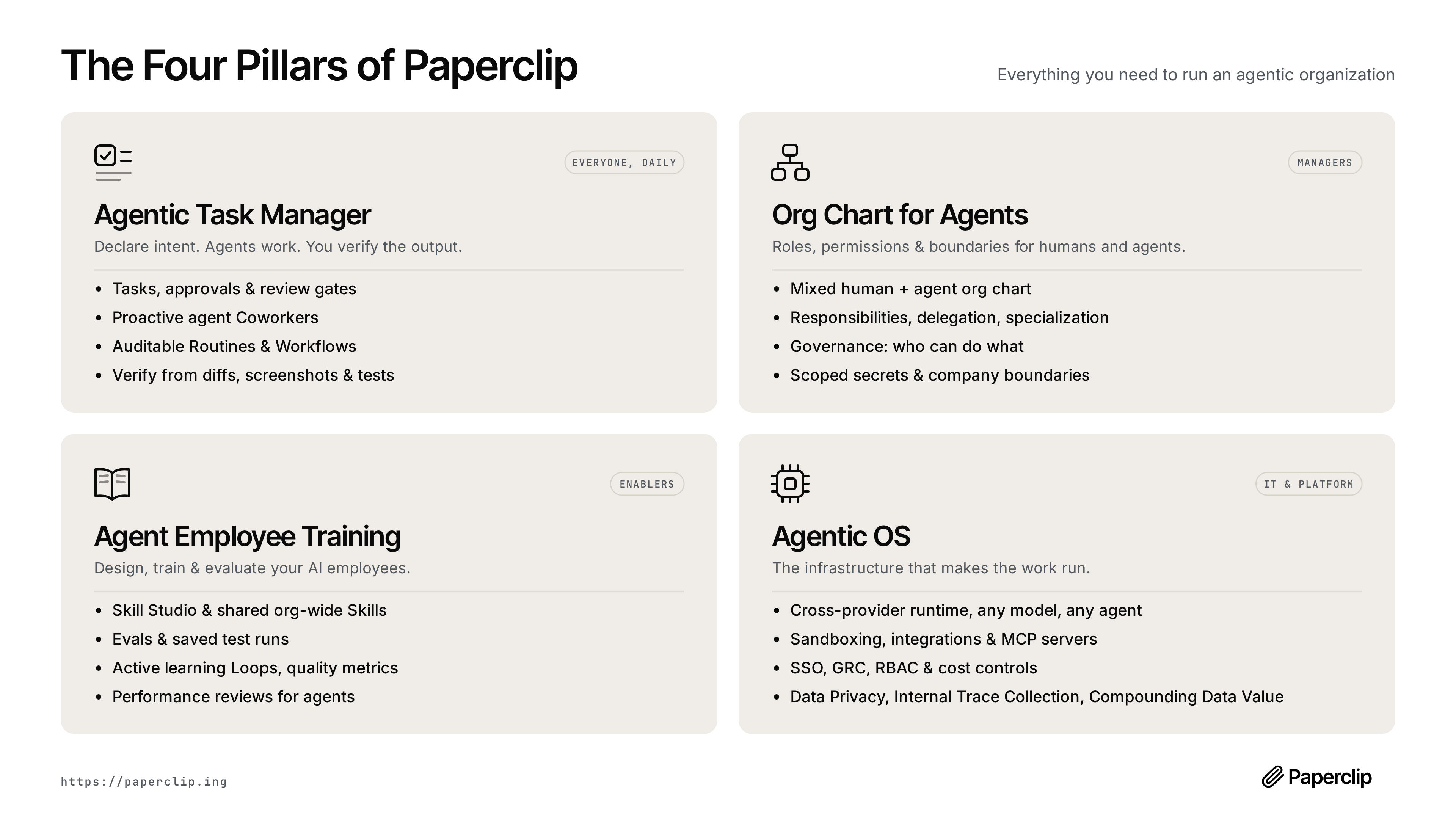
| Pillar | Built for | What it covers |
|---|---|---|
| Agentic Task Manager — Declare intent. Agents work. You verify the output. | Everyone, daily | Tasks, approvals & review gates · proactive agent coworkers · auditable routines & workflows · verify from diffs, screenshots & tests |
| Org Chart for Agents — Roles, permissions & boundaries for humans and agents. | Managers | Mixed human + agent org chart · responsibilities, delegation, specialization · governance: who can do what · scoped secrets & company boundaries · connection permissions & responsible-user identities |
| Agent Employee Training — Design, train & evaluate your AI employees. | Enablers | Skill Studio & shared org-wide skills · evals & saved test runs · active learning loops & quality metrics · performance reviews for agents · saved test inputs · skill version history & restore · reusable team templates |
| Agentic OS — The infrastructure that makes the work run. | IT & platform | Cross-provider runtime: any model, any agent · sandboxing, integrations & MCP servers · SSO, GRC, RBAC & cost controls · data privacy, internal trace collection, compounding data value · personal & shared app connections · run history & opt-in tracing |
Features
🔌 Bring Your Own AgentAny agent, any runtime, one org chart. If it can receive a heartbeat, it's hired. |
🎯 Goal AlignmentLink tasks and projects to your organization goals. Agents receive the goal context behind their work. |
💓 HeartbeatsAgents wake for assigned work, follow-up messages, or configured schedules. Delegation flows up and down the org chart. |
💰 Cost ControlCompany, agent, and project budgets. Track reported spend, get threshold alerts, and pause work at configured limits. |
🏢 Multi-OrganizationOne deployment, many organizations. Separate tasks, agents, permissions, and activity histories for each. |
🎫 Task ThreadsKeep conversations, plans, blockers, files, and run history attached to the work. Assign tasks to agents or people. |
🛡️ GovernanceConfigure review and approval stages, approve hires, and pause, reassign, or stop work when needed. |
📊 Org ChartHierarchies, roles, reporting lines. Your agents have a boss, a title, and a job description. |
📱 Mobile ReadyMonitor and manage your autonomous businesses from anywhere. |
🔗 Apps & ConnectionsConnect services such as GitHub, Notion, and Railway, or your own MCP server. Set gateway actions to Allowed, Ask first, or Off. |
👥 Shared Agents, Personal AccountsChoose who can use a connection and which agents can access it. Managed GitHub operations can use the account of the person directing the work. |
🧠 Skills & Skill StudioInstall or write shared skills, test them with saved inputs, inspect results, and restore earlier versions. |
📅 Scheduled RoutinesRun recurring work on a schedule or trigger it through an API or webhook. Each run has a task, an owner, and a history. |
📎 Artifacts & FeedbackFind the files and documents agents produce. Preview supported formats and leave comments on specific passages in documents. |
📦 Ready-Made TeamsPreview and install teams with roles, skills, projects, and routines. Choose their runtimes and make the setup your own. |
Experimental Agent Chat and chat/email connectors add conversations with agents in Paperclip and through configured services such as Slack, Discord, Telegram, and AgentMail. Enable the relevant instance settings to try them.
Problems Paperclip solves
| Without Paperclip | With Paperclip |
|---|---|
| ❌ You have 20 Claude Code tabs open and can't track which one does what. On reboot you lose everything. | ✅ Tasks are ticket-based, conversations are threaded, sessions persist across reboots. |
| ❌ You manually gather context from several places to remind your bot what you're actually doing. | ✅ Context flows from the task up through the project and company goals — your agent always knows what to do and why. |
| ❌ Folders of agent configs are disorganized and you're re-inventing task management, communication, and coordination between agents. | ✅ Paperclip gives you org charts, ticketing, delegation, and governance out of the box — so you run a company, not a pile of scripts. |
| ❌ Runaway loops waste hundreds of dollars of tokens and max your quota before you even know what happened. | ✅ Spend tracking, budget alerts, and automatic pauses help you control the cost of ongoing work. |
| ❌ You have recurring jobs (customer support, social, reports) and have to remember to manually kick them off. | ✅ Routines create assigned tasks on a schedule, with outputs and run history you can inspect. |
| ❌ You have an idea, you have to find your repo, fire up Claude Code, keep a tab open, and babysit it. | ✅ Add a task in Paperclip. Your coding agent works on it until it's done. Management reviews their work. |
Why Paperclip is special
Paperclip handles the hard orchestration details correctly.
| Atomic task checkout. | A single assignee and execution locks prevent competing runs from claiming the same task. |
| Persistent work context. | Tasks, comments, and documents stay in Paperclip. Supporting adapters resume saved sessions across runs. |
| Runtime skill injection. | Agents can learn Paperclip workflows and project context at runtime, without retraining. |
| Governance with rollback. | Approval gates are enforced, config changes are revisioned, and bad changes can be rolled back safely. |
| Accountable connections. | Human access, agent eligibility, and gateway action permissions are separate controls. Approve a call once or save a revocable rule. |
| Goal-aware execution. | Linked tasks and projects carry goal ancestry so agents see the "why," not just a title. |
| Portable company templates. | Export/import orgs, agents, and skills with secret scrubbing and collision handling. |
| Organization boundaries. | Company-scoped access checks keep each organization's work, agents, and activity separate within one deployment. |
What's Under the Hood
Paperclip is a full control plane, not a wrapper. Before you build any of this yourself, know that it already exists:
┌──────────────────────────────────────────────────────────────┐
│                       PAPERCLIP SERVER                       │
│                                                              │
│  ┌───────────┐  ┌───────────┐  ┌───────────┐  ┌───────────┐  │
│  │Identity & │  │  Work &   │  │ Heartbeat │  │Governance │  │
│  │  Access   │  │   Tasks   │  │ Execution │  │& Approvals│  │
│  └───────────┘  └───────────┘  └───────────┘  └───────────┘  │
│                                                              │
│  ┌───────────┐  ┌───────────┐  ┌───────────┐  ┌───────────┐  │
│  │ Org Chart │  │Workspaces │  │  Plugins  │  │  Budget   │  │
│  │ & Agents  │  │ & Runtime │  │           │  │ & Costs   │  │
│  └───────────┘  └───────────┘  └───────────┘  └───────────┘  │
│                                                              │
│  ┌───────────┐  ┌───────────┐  ┌───────────┐  ┌───────────┐  │
│  │ Routines  │  │ Secrets & │  │ Activity  │  │  Company  │  │
│  │& Schedules│  │  Storage  │  │ & Events  │  │Portability│  │
│  └───────────┘  └───────────┘  └───────────┘  └───────────┘  │
└──────────────────────────────────────────────────────────────┘
         ▲              ▲              ▲              ▲
   ┌─────┴─────┐  ┌─────┴─────┐  ┌─────┴─────┐  ┌─────┴─────┐
   │  Claude   │  │   Codex   │  │   CLI     │  │ HTTP/web  │
   │   Code    │  │           │  │  agents   │  │   bots    │
   └───────────┘  └───────────┘  └───────────┘  └───────────┘
The Systems
|
Identity & Access — Two deployment modes (trusted local or authenticated), human roles and permissions, agent API keys, short-lived run JWTs, company memberships, and invite flows. Responsible-user attribution follows work through delegation and supported managed connections. |
Org Chart & Agents — Agents have roles, titles, reporting lines, permissions, and budgets. Adapter examples match the diagram: Claude Code, Codex, CLI agents such as Cursor/Gemini/bash, HTTP/webhook bots such as OpenClaw, and external adapter plugins. If it can receive a heartbeat, it's hired. |
|
Work & Task System — Issues carry company/project/goal/parent links, atomic checkout with execution locks, first-class blocker dependencies, comments, documents, attachments, work products, labels, and inbox state. Search across work, review document revisions, and leave anchored feedback. |
Heartbeat Execution — DB-backed wakeup queue with coalescing, budget checks, workspace resolution, secret injection, skill loading, and adapter invocation. Runs produce logs, usage records, and adapter-specific session state. Bounded recovery handles supported failures and surfaces cases that need human action. |
|
Workspaces & Runtime — Project repositories and workspaces, optional isolated execution workspaces (git worktrees, operator branches), and runtime services (dev servers, preview URLs). Sandbox providers extend execution beyond the local host; availability depends on the configured environment and adapter. |
Governance & Approvals — Board approval workflows, execution policies with review/approval stages, decision tracking, budget hard-stops, and agent pause/resume/terminate. Configured task reviews govern completion; connection action approvals govern calls through the tool gateway. |
|
Budget & Cost Control — Token and cost tracking by company, agent, project, goal, issue, provider, and model. Scoped budget policies with warning thresholds and hard stops. Enforcement uses recorded spend; usage reporting and in-flight work can delay a stop. |
Routines & Schedules — Recurring tasks with cron, webhook, and API triggers. Concurrency and catch-up policies. Each routine execution creates a tracked issue and wakes the assigned agent — no manual kick-offs needed. |
|
Plugins — Instance-wide plugin system with out-of-process workers, capability-gated host services, job scheduling, tool exposure, and UI contributions. Extend Paperclip without forking it. |
Secrets & Storage — Company secrets and per-person secret values, encrypted credential storage, local or S3-compatible file storage, attachments, and work products. Secret references supply credentials to authorized runs without copying values into ordinary agent configuration. |
|
Activity & Events — Mutating actions, heartbeat state changes, cost events, approvals, comments, and work products are recorded as durable activity so operators can audit what happened and why. |
Company Portability — Preview, export, and import organization packages with agents, skills, and optional projects, routines, tasks, and attachments. Referenced secret values are omitted; review packages before sharing because plain environment values and local paths can remain. Packages share an operating setup; full-instance recovery uses backups. |
What Paperclip is not
| Not just a chatbot. | Conversations stay attached to tasks, plans, decisions, and outputs. Experimental Agent Chat can hand work off to assigned tasks. |
| Not an agent framework. | We don't tell you how to build agents. We tell you how to run a company made of them. |
| Not just a workflow builder. | Routines operate within an organization, with roles, goals, budgets, and governance. |
| Not a prompt manager. | Agents bring their own prompts, models, and runtimes. Paperclip manages the organization they work in. |
| Not limited to one agent. | Start with one agent and grow into a team with shared skills, delegation, and review. |
| Not only for code review. | Coding and PR review fit alongside research, operations, content, and other work. |
Quickstart
Open source. Self-hosted. No Paperclip account required. Follow the guided quickstart to set up your first agent.
Just ask your agent to install Paperclip
Share the installation guide with your agent.
Or install it yourself
With Node.js 24.11 or newer installed:
npx paperclipai@latest onboard --yes
The CLI runs from npm's cache; your instance configuration and data persist locally.
See the installation guide for managed installs, pinned versions, canary and git-ref installs, updates, rollback, service management, and uninstalling.
For an isolated manual test instance that is already initialized with a CEO
agent, use test-drive. It stays in the foreground, never installs a service
or creates a first task, and opens the browser only after setup succeeds:
ANTHROPIC_API_KEY=... npx paperclipai test-drive
OPENAI_API_KEY=... npx paperclipai test-drive --harness codex
OPENROUTER_API_KEY=... npx paperclipai test-drive \
  --harness opencode \
  --model openrouter/anthropic/claude-sonnet-4.5
Each run without --data-dir gets a unique, retained temporary directory; its
absolute path is printed at startup. Pass --data-dir to reuse one, or
--no-browser to leave the initialized instance unopened. When invoked from a
linked Git worktree, test-drive also enables task execution in that worktree.
See the test-drive guide for credential and
reuse behavior.
Troubleshooting: private npm registry
.npmrcIf this fails with an
E404forpaperclipai(or similar) and you use a private npm registry (for example GitHub Packages) via a global~/.npmrc,npxmay be resolvingpaperclipaiagainst that private registry instead of the public npm registry.Diagnostic:
npm config get registryWorkaround (cross-platform; force the public npm registry for this command):
npx --registry https://registry.npmjs.org paperclipai@latest onboard --yes
That quickstart path now defaults to trusted local loopback mode for the fastest first run. To start in authenticated/private mode instead, choose a bind preset explicitly:
npx paperclipai@latest onboard --yes --bind lan
# or:
npx paperclipai@latest onboard --yes --bind tailnet
If you already have Paperclip configured, rerunning onboard keeps the existing config in place. Use npx paperclipai configure to edit settings.
Or manually:
git clone https://github.com/paperclipai/paperclip.git
cd paperclip
pnpm install
pnpm dev
This starts the UI and API at http://localhost:3100. An embedded PostgreSQL database is created automatically — no setup required.
Requirements: Node.js 24.11+, pnpm 9.15+
Local Claude and Codex subscription sign-in also needs Python 3 and the corresponding provider CLI on the Paperclip host. The Docker image includes them.
Source development also builds the native Paperclip Runner when enabled (the self-hosted default). Install a Rust toolchain, or set PAPERCLIP_RUNNER_BINARY to a compatible prebuilt runner.
FAQ
Q: Is this project maintained or just slop?
A: Paperclip is maintained by the Paperclip team. We've merged over 2,700 pull requests.
Q: What does a typical setup look like?
A: Locally, a single Node.js process manages an embedded Postgres and local file storage. For production, point it at your own Postgres and deploy however you like. Configure projects, agents, and goals — the agents take care of the rest.
For remote access, use authenticated mode with a private-network bind such as Tailscale, or deploy the persistent server with Docker. See deployment modes and the Docker guide.
Q: Can I run multiple companies?
A: Yes. A single deployment can host multiple organizations with company-scoped data and access checks.
Q: How is Paperclip different from agents like OpenClaw or Claude Code?
A: Paperclip uses those agents. It orchestrates them into a company — with org charts, budgets, goals, governance, and accountability.
Q: Why should I use Paperclip instead of just pointing my OpenClaw to Asana or Trello?
A: Agent orchestration has subtleties in how you coordinate who has work checked out, how to maintain sessions, monitoring costs, establishing governance - Paperclip does this for you.
(Bring-your-own-ticket-system is on the Roadmap)
Q: Do agents run continuously?
A: Agents wake for assigned work and follow-up messages. Optional timer heartbeats let them check for work periodically; routines create recurring tasks on their own schedules. You can also connect externally running agents such as OpenClaw. A mention alone does not assign work or wake another agent.
Development
pnpm dev              # Full dev (API + UI, watch mode)
pnpm dev:once         # Full dev without file watching
pnpm dev:server       # Server only
pnpm dev:mobile       # Serve prebuilt UI on :3101 for phones/tablets (proxies /api → :3100)
pnpm dev:both         # Run `pnpm dev` and `pnpm dev:mobile` together
pnpm build            # Build all
pnpm typecheck        # Type checking
pnpm test             # Cheap default test run (Vitest only)
pnpm test:watch       # Vitest watch mode
pnpm test:e2e         # Playwright browser suite
pnpm db:generate      # Generate DB migration
pnpm db:migrate       # Apply migrations
pnpm test does not run Playwright. Browser suites stay separate and are typically run only when working on those flows or in CI.
See doc/DEVELOPING.md for the full development guide.
Roadmap
- ✅ Plugin system (e.g. add a knowledge base, custom tracing, queues, etc)
- ✅ Get OpenClaw / claw-style agent employees
- ✅ companies.sh - import and export entire organizations
- ✅ Easy AGENTS.md configurations
- ✅ Skills Manager, Skill Studio & Skills Store
- ✅ Scheduled Routines
- ✅ Better Budgeting
- ✅ Agent Reviews and Approvals
- ✅ Multiple Human Users
- ✅ Cloud / Sandbox agents (e2b, Cloudflare, Daytona, Modal, Novita, boxd, self-hosted Kubernetes)
- ✅ Artifacts & Work Products
- ✅ Deep Planning (planning mode, revisioned plans, plan approvals)
- ✅ Enforced Outcomes (watchdogs, recovery actions, review gates)
- ✅ MCP Tool Gateway & Apps (governed tool access)
- ✅ Secrets Manager with per-agent access
- ✅ Activity log & action attribution
- ✅ Self-healing runs & automatic recovery
- ✅ Agent evals & feedback
- ✅ Connected Apps
- ✅ Personal & Shared AI Accounts
- ✅ Shared Agents Use Personal GitHub Identities
- ✅ Skill Version History & Restore
- ✅ Document Comments & Revision History
- ✅ Company-Wide Search
- ✅ Multi-Model & Multi-Harness Teams
- 🟡 Memory / Knowledge
- ⚪ MAXIMIZER MODE
- ⚪ Work Queues
- ⚪ Self-Organization
- ⚪ Automatic Organizational Learning
- 🟡 Agent Chat
- 🟡 Cloud deployments
- ⚪ Desktop App
- ⚪ Bring-your-own-ticket-system (Asana / Linear / Jira as on-ramps)
This is the short roadmap preview. See the full roadmap in ROADMAP.md.
Community & Plugins
Find Plugins and more at awesome-paperclip
Observability
Paperclip ships with opt-in OpenTelemetry auto-instrumentation for the server (traces only). It activates when OTEL_EXPORTER_OTLP_ENDPOINT is set and supports grpc, http/protobuf, and http/json via the standard OTEL_EXPORTER_OTLP_PROTOCOL env var. @opentelemetry/api is a normal server dependency; the SDK, auto-instrumentation, and exporter packages are optional peer dependencies — install them only if you want tracing. See doc/observability.md for install commands and the full env-var reference.
Paperclip also ships with opt-in Sentry error monitoring for the server and the browser. Set SENTRY_DSN_FRONTEND to activate it for the browser and SENTRY_DSN_BACKEND to activate it for the server — each variable is optional, and the legacy SENTRY_DSN variable still works as a fallback for either component. The supported server SDK version is @sentry/node@10.71.0; it is an optional peer dependency for the server, so install it only if you want error monitoring. The browser SDK, @sentry/browser, is pinned to the same exact version. See doc/observability.md for the install command, the privacy settings, and the full default capture set.
Telemetry
Paperclip collects anonymous usage telemetry to help us understand how the product is used and improve it. No personal information, issue content, prompts, file paths, or secrets are ever collected. Private repository references are hashed with a per-install salt before being sent.
Contributors changing emitted telemetry events should follow the Telemetry Data Contract. For proposed first-party events that are not in the generated contract yet, follow Telemetry Workflow.
Telemetry is enabled by default and can be disabled with any of the following:
| Method | How |
|---|---|
| Environment variable | PAPERCLIP_TELEMETRY_DISABLED=1 |
| Standard convention | DO_NOT_TRACK=1 |
| CI environments | Automatically disabled when CI=true |
| Config file | Set telemetry.enabled: false in your Paperclip config |
Contributing
We welcome contributions. See the contributing guide for details.
Community
- Discord — Join the community
- Twitter / X — Follow updates and announcements
- GitHub Issues — bugs and feature requests
- GitHub Discussions — ideas and RFC
License
MIT © 2026 Paperclip Labs, Inc
Star History
Open source under MIT. Built for people who want to get work done, not babysit agents.