 DottaandPaperclip
9f30eb10dd
DottaandPaperclip
9f30eb10dd
## Thinking Path

> - Paperclip manages AI agents and keeps their work attached to tasks.
> - Chat connectors carry user messages and agent replies between a
provider and those tasks.
> - Each extra startup and context reset delays a reply.
> - Managed account metadata was lost during adapter decoding, so
compatible follow-ups started fresh.
> - This branch fixes the reset and measures the remaining preparation,
execution, and delivery costs.
> - The changes must preserve account isolation, authorization, durable
output, and recovery ownership.

## Linked Issues or Issue Description

Refs #13699. The related service lifecycle work in #13410 and #13408 is
separate; this branch focuses on task-bound chat response latency.

**What happened?**

Managed AI follow-ups started new provider sessions even after their
configuration fingerprint stayed stable. The Codex codec removes unknown
fields. The resume check then read the removed credential identity and
treated it as a credential change.

**Expected behavior**

Compatible follow-ups resume the correct provider session. Changes to
credentials, responsible users, permissions, or task configuration
retain their reset behavior.

**Steps to reproduce**

1. Use a Slack connector with a managed AI connection.
2. Send a message, then send a same-thread follow-up.
3. Inspect the configuration reset reason and the provider session
identity.

**Paperclip version or commit**

Reproduced on `2a99de80ec52db01eead901f28323926ceaf3c1d`.

**Deployment mode**

Cloud staging with a native Codex runner.

## What Changed

- Read saved credential identity before adapter decoding discards it.
- Remove the internal credential identity from adapter-facing session
params.
- Test the real Codex codec and missing, changed, or unmanaged identity
cases.
- Preserve configured warm Codex runners and flush refreshed credentials
after every turn.
- Fence detached or closing session handles from successor credential
ownership.
- Stage current Codex launch credentials after restoring durable session
history, uploading launch assets only once.
- Reuse a runner binary already in the retained sandbox only when its
SHA-256 matches the controller-owned artifact; still verify required
capabilities before launch.
- Lock the task before the run when saving results, preventing deadlocks
with task updates.
- Scope reusable projectless sandboxes to the company, environment,
task, agent, and runtime configuration; verify Daytona sentinels for
that scope.
- Admit a new authorized chat message after a fully committed failed run
and verified process cleanup.
- Send compact deltas for verified plain-text Slack continuations. Match
the actual prior run and current comment identity/body; exclude edited
historical comments and prior agent output, preserve genuine brief edits
and the full bootstrap fallback.
- Keep attachments, omitted input, questions, approvals, recovery, and
other providers on their existing framing.
- Document managed session compatibility, credential lifecycle, and
compact continuation boundaries.

## Verification

- Workspace/session coverage: 156 tests passed.
- Native session and credential ownership coverage: 390 tests passed,
including exact artifact reuse, mismatches, failed probes, timeouts, and
explicit artifact overrides.
- Explicit continuation and durable chat authorization coverage: 172
tests passed.
- Session resume and launch preparation coverage: 416 tests passed.
- Result persistence coverage: 15 tests passed. The new concurrency test
reproduced a PostgreSQL deadlock before the lock-order fix.
- Environment lifecycle coverage: 92 tests passed, including projectless
reuse and task/agent isolation at both selection and atomic handoff.
- Daytona plugin coverage: 237 tests passed; 6 gated tests skipped.
Standalone plugin build passed.
- Compact Slack continuation and native resume coverage: 69 tests
passed, including full-bootstrap retention, matching message
authors/bodies, current-delivery selection, rejection of duplicate
identities and historical comments, brief edits, and attachment/recovery
fallbacks.
- Final frozen-head `pnpm test:run` on repository-supported Node 26: 668
suites passed, 3 skipped, 1 failed; 12,797 tests passed and 82 skipped.
The sole failure was a local `socket hang up` in
`issue-recovery-actions.test.ts`, not an authorization assertion
mismatch. All 57 tests in that suite passed three fresh reruns, and the
suite passed latest-head CI. The full local invocation is therefore not
claimed green.
- An earlier Node 24 full run exposed an unrelated macOS symlink-cleanup
failure; that 11-test catalog suite passes on Node 26 and in CI. No test
behavior or timeout was relaxed.
- Full local typecheck and build passed. Latest-head CI is green;
Greptile is 5/5 with no unresolved review threads.
- Two real Slack baseline replies took 25.1 and 24.6 seconds
(24.9-second mean). Three same-thread signed probes on this head took
23.8, 23.9, and 22.7 seconds (23.5-second mean). This is a small sample
and a modest wall-clock improvement, not a large or statistically
established speedup.
- In that same thread, uncached provider input fell from 8,514 tokens
before compact input to 694–765 tokens afterward. The current delivery
uses a 362-character delta; the full 19–21k-character bootstrap remains
available for failed resume. Verified runner artifact preparation fell
from about 1.2 seconds to 0.6 seconds.
- A fresh thread created a separate task, sandbox, and provider session
with full bootstrap (24.4 seconds). Its follow-up reused its own
sandbox/session and compact input (28.3 seconds, including 16 seconds of
model execution). Model variability and process startup remain
substantial.
- A signed duplicate webhook produced exactly one user comment, one
successful run, and one final Slack reply. Slack's API independently
confirmed the actual replies and a public task URL without an internal
or pool hostname.
- Earlier signed probes verified recovery after a failed run and reuse
across a server deployment. The final idle test observed Daytona report
the sandbox as stopped, then delivered a new reply in 19.9 seconds using
the same sandbox/provider-session identity and compact input. Slack’s
API confirmed that reply.
- Live probes use signed synthetic inbound webhooks and real outbound
Slack delivery, read back through Slack’s API. The final browser recheck
found the Mac locked and the Slack tab blocked by another extension, so
this is not claimed as full UI E2E proof.
- This is a review branch. Do not merge until the maintainer reviews it.

## Risks

- Incorrect session reuse could mix account or task context. Missing or
changed identities continue to reset, and existing authorization checks
remain in place.
- Warm mode remains opt-in. Remote warm mode requires a reusable sandbox
lease. Retained processes keep credentials until they close, so idle
expiry and ownership fences are required.
- A fresh user message may continue after a committed provider failure.
Approval, current authorization, process termination, and prior-result
checks remain required.
- Projectless sandbox reuse is task- and agent-scoped. Missing or
mismatched ownership cannot replace an existing lease; existing
workspace-scoped leases keep their scope. Opt-in reuse retains a sandbox
per task/agent, so provider auto-stop and deletion policies still
determine idle compute and storage costs. Fleet defaults are unchanged.
- Compact prompts apply only after proven resume and a matching
prior-run delta. Missing or specialized context falls back to full
input; fresh sessions always receive the full bootstrap.
- No schema or migration changes.

## Model Used

OpenAI GPT-6 through Codex, with code editing, tool use, and test
execution. The exact serving model ID and context-window size are not
exposed by this session.

## Checklist

- [x] I have included a thinking path that traces from project context
to this change
- [x] I have specified the model used (with version and capability
details)
- [x] I have checked ROADMAP.md and confirmed this PR does not duplicate
planned core work
- [x] I have searched GitHub for duplicate or related PRs and linked
them above
- [x] I have either (a) linked existing issues with `Fixes: #` / `Closes
#` / `Refs #` OR (b) described the issue in-PR following the relevant
issue template
- [x] I have not referenced internal/instance-local Paperclip issues or
links (only public GitHub `#NNN` / `github.com/paperclipai/paperclip`
URLs)
- [x] My branch name describes the change (e.g. `docs/...`, `fix/...`)
and contains no internal Paperclip ticket id or instance-derived details
- [ ] I have run tests locally and they pass
- [x] I have added or updated tests where applicable
- [x] I have updated relevant documentation to reflect my changes
- [x] I have considered and documented any risks above
- [x] All Paperclip CI gates are green
- [x] Greptile is 5/5 with no open P2s, recommendations, or follow-ups
- [x] I will address all Greptile and reviewer comments before
requesting merge

---------

Co-authored-by: Paperclip <noreply@paperclip.ing>

Quickstart · Docs · GitHub · Discord · Twitter · Website


Paperclip is the app people use to manage AI agents for work.
Open-source orchestration for teams of AI agents.
If OpenClaw is an employee, Paperclip is the company.
Paperclip is a Node.js server and React UI that orchestrates a team of AI agents to run a business. Bring your own agents, assign goals, and track work and costs from one dashboard.
It looks like a task manager. Under the hood: org charts, budgets, governance, goal alignment, and agent coordination.
Manage business goals, not pull requests.
| Step | Example | |
|---|---|---|
| 01 | Define the goal | "Build the #1 AI note-taking app to $1M MRR." |
| 02 | Hire the team | CEO, CTO, engineers, designers, marketers — any bot, any provider. |
| 03 | Approve and run | Review strategy. Set budgets. Hit go. Monitor from the dashboard. |
| Works with |
 OpenClaw |
 Claude Code |
 Codex |
 Cursor |
 Bash |
 HTTP |
If it can receive a heartbeat, it's hired.
Paperclip is right for you if
- ✅ You want to build autonomous AI organizations
- ✅ You coordinate many different agents (OpenClaw, Codex, Claude, Cursor) toward a common goal
- ✅ You have 20 simultaneous Claude Code terminals open and lose track of what everyone is doing
- ✅ You want agents running autonomously 24/7, but still want to audit work and chime in when needed
- ✅ You want to monitor costs and enforce budgets
- ✅ You want a process for managing agents that feels like using a task manager
- ✅ You want to manage your autonomous businesses from your phone
The four pillars
Four things have to work for an organization of AI agents to actually produce: the tasks, the org, the training, and the infrastructure. Paperclip is built around exactly those four pillars.
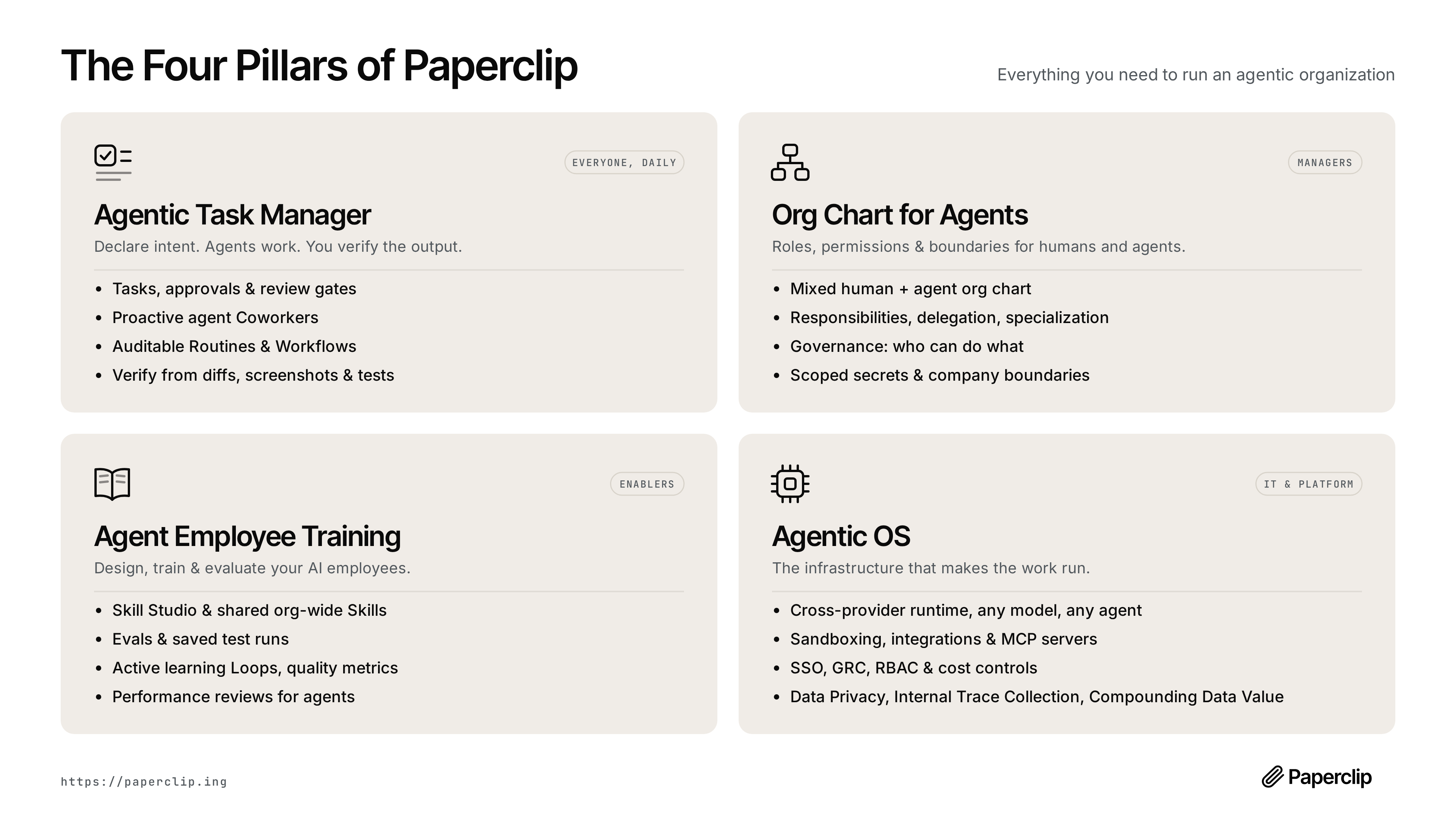
| Pillar | Built for | What it covers |
|---|---|---|
| Agentic Task Manager — Declare intent. Agents work. You verify the output. | Everyone, daily | Tasks, approvals & review gates · proactive agent coworkers · auditable routines & workflows · verify from diffs, screenshots & tests |
| Org Chart for Agents — Roles, permissions & boundaries for humans and agents. | Managers | Mixed human + agent org chart · responsibilities, delegation, specialization · governance: who can do what · scoped secrets & company boundaries |
| Agent Employee Training — Design, train & evaluate your AI employees. | Enablers | Skill Studio & shared org-wide skills · evals & saved test runs · active learning loops & quality metrics · performance reviews for agents |
| Agentic OS — The infrastructure that makes the work run. | IT & platform | Cross-provider runtime: any model, any agent · sandboxing, integrations & MCP servers · SSO, GRC, RBAC & cost controls · data privacy, internal trace collection, compounding data value |
Features
🔌 Bring Your Own AgentAny agent, any runtime, one org chart. If it can receive a heartbeat, it's hired. |
🎯 Goal AlignmentEvery task traces back to the organization mission. Agents know what to do and why. |
💓 HeartbeatsAgents wake on a schedule, check work, and act. Delegation flows up and down the org chart. |
💰 Cost ControlMonthly budgets per agent. When they hit the limit, they stop. No runaway costs. |
🏢 Multi-OrganizationOne deployment, many organizations. Complete data isolation. One control plane for your portfolio. |
🎫 Ticket SystemEvery conversation traced. Every decision explained. Full tool-call tracing and immutable audit log. |
🛡️ GovernanceApprove hires, override strategy, pause or terminate any agent — at any time. |
📊 Org ChartHierarchies, roles, reporting lines. Your agents have a boss, a title, and a job description. |
📱 Mobile ReadyMonitor and manage your autonomous businesses from anywhere. |
Problems Paperclip solves
| Without Paperclip | With Paperclip |
|---|---|
| ❌ You have 20 Claude Code tabs open and can't track which one does what. On reboot you lose everything. | ✅ Tasks are ticket-based, conversations are threaded, sessions persist across reboots. |
| ❌ You manually gather context from several places to remind your bot what you're actually doing. | ✅ Context flows from the task up through the project and company goals — your agent always knows what to do and why. |
| ❌ Folders of agent configs are disorganized and you're re-inventing task management, communication, and coordination between agents. | ✅ Paperclip gives you org charts, ticketing, delegation, and governance out of the box — so you run a company, not a pile of scripts. |
| ❌ Runaway loops waste hundreds of dollars of tokens and max your quota before you even know what happened. | ✅ Cost tracking surfaces token budgets and throttles agents when they're out. Management prioritizes with budgets. |
| ❌ You have recurring jobs (customer support, social, reports) and have to remember to manually kick them off. | ✅ Heartbeats handle regular work on a schedule. Management supervises. |
| ❌ You have an idea, you have to find your repo, fire up Claude Code, keep a tab open, and babysit it. | ✅ Add a task in Paperclip. Your coding agent works on it until it's done. Management reviews their work. |
Why Paperclip is special
Paperclip handles the hard orchestration details correctly.
| Atomic execution. | Task checkout and budget enforcement are atomic, so no double-work and no runaway spend. |
| Persistent agent state. | Agents resume the same task context across heartbeats instead of restarting from scratch. |
| Runtime skill injection. | Agents can learn Paperclip workflows and project context at runtime, without retraining. |
| Governance with rollback. | Approval gates are enforced, config changes are revisioned, and bad changes can be rolled back safely. |
| Goal-aware execution. | Tasks carry full goal ancestry so agents consistently see the "why," not just a title. |
| Portable company templates. | Export/import orgs, agents, and skills with secret scrubbing and collision handling. |
| True multi-organization isolation. | Every entity is company-scoped, so one deployment can run many companies with separate data and audit trails. |
What's Under the Hood
Paperclip is a full control plane, not a wrapper. Before you build any of this yourself, know that it already exists:
┌──────────────────────────────────────────────────────────────┐
│                       PAPERCLIP SERVER                       │
│                                                              │
│  ┌───────────┐  ┌───────────┐  ┌───────────┐  ┌───────────┐  │
│  │Identity & │  │  Work &   │  │ Heartbeat │  │Governance │  │
│  │  Access   │  │   Tasks   │  │ Execution │  │& Approvals│  │
│  └───────────┘  └───────────┘  └───────────┘  └───────────┘  │
│                                                              │
│  ┌───────────┐  ┌───────────┐  ┌───────────┐  ┌───────────┐  │
│  │ Org Chart │  │Workspaces │  │  Plugins  │  │  Budget   │  │
│  │ & Agents  │  │ & Runtime │  │           │  │ & Costs   │  │
│  └───────────┘  └───────────┘  └───────────┘  └───────────┘  │
│                                                              │
│  ┌───────────┐  ┌───────────┐  ┌───────────┐  ┌───────────┐  │
│  │ Routines  │  │ Secrets & │  │ Activity  │  │  Company  │  │
│  │& Schedules│  │  Storage  │  │ & Events  │  │Portability│  │
│  └───────────┘  └───────────┘  └───────────┘  └───────────┘  │
└──────────────────────────────────────────────────────────────┘
         ▲              ▲              ▲              ▲
   ┌─────┴─────┐  ┌─────┴─────┐  ┌─────┴─────┐  ┌─────┴─────┐
   │  Claude   │  │   Codex   │  │   CLI     │  │ HTTP/web  │
   │   Code    │  │           │  │  agents   │  │   bots    │
   └───────────┘  └───────────┘  └───────────┘  └───────────┘
The Systems
|
Identity & Access — Two deployment modes (trusted local or authenticated), board users, agent API keys, short-lived run JWTs, company memberships, invite flows, and OpenClaw onboarding. Every mutating request is traced to an actor. |
Org Chart & Agents — Agents have roles, titles, reporting lines, permissions, and budgets. Adapter examples match the diagram: Claude Code, Codex, CLI agents such as Cursor/Gemini/bash, HTTP/webhook bots such as OpenClaw, and external adapter plugins. If it can receive a heartbeat, it's hired. |
|
Work & Task System — Issues carry company/project/goal/parent links, atomic checkout with execution locks, first-class blocker dependencies, comments, documents, attachments, work products, labels, and inbox state. No double-work, no lost context. |
Heartbeat Execution — DB-backed wakeup queue with coalescing, budget checks, workspace resolution, secret injection, skill loading, and adapter invocation. Runs produce structured logs, cost events, session state, and audit trails. Recovery handles orphaned runs automatically. |
|
Workspaces & Runtime — Project workspaces, isolated execution workspaces (git worktrees, operator branches), and runtime services (dev servers, preview URLs). Agents work in the right directory with the right context every time. |
Governance & Approvals — Board approval workflows, execution policies with review/approval stages, decision tracking, budget hard-stops, agent pause/resume/terminate, and full audit logging. Nothing ships without your sign-off. |
|
Budget & Cost Control — Token and cost tracking by company, agent, project, goal, issue, provider, and model. Scoped budget policies with warning thresholds and hard stops. Overspend pauses agents and cancels queued work automatically. |
Routines & Schedules — Recurring tasks with cron, webhook, and API triggers. Concurrency and catch-up policies. Each routine execution creates a tracked issue and wakes the assigned agent — no manual kick-offs needed. |
|
Plugins — Instance-wide plugin system with out-of-process workers, capability-gated host services, job scheduling, tool exposure, and UI contributions. Extend Paperclip without forking it. |
Secrets & Storage — Instance and company secrets, encrypted local storage, provider-backed object storage, attachments, and work products. Sensitive values stay out of prompts unless a scoped run explicitly needs them. |
|
Activity & Events — Mutating actions, heartbeat state changes, cost events, approvals, comments, and work products are recorded as durable activity so operators can audit what happened and why. |
Company Portability — Export and import entire organizations — agents, skills, projects, routines, and issues — with secret scrubbing and collision handling. One deployment, many companies, complete data isolation. |
What Paperclip is not
| Not a chatbot. | Agents have jobs, not chat windows. |
| Not an agent framework. | We don't tell you how to build agents. We tell you how to run a company made of them. |
| Not a workflow builder. | No drag-and-drop pipelines. Paperclip models companies — with org charts, goals, budgets, and governance. |
| Not a prompt manager. | Agents bring their own prompts, models, and runtimes. Paperclip manages the organization they work in. |
| Not a single-agent tool. | This is for teams. If you have one agent, you probably don't need Paperclip. If you have twenty — you definitely do. |
| Not a code review tool. | Paperclip orchestrates work, not pull requests. Bring your own review process. |
Quickstart
Open source. Self-hosted. No Paperclip account required.
curl -fsSLO https://paperclip.ing/install.sh
curl -fsSLO https://paperclip.ing/install.sh.sha256
if command -v sha256sum >/dev/null 2>&1; then
  sha256sum -c install.sh.sha256
else
  shasum -a 256 -c install.sh.sha256
fi
bash install.sh
The installer ensures Node.js 24.11 or newer is available, installs a managed
Paperclip CLI under ~/.paperclip/cli, and starts interactive onboarding. It
can also install Paperclip as a background service on supported Linux and
macOS systems. The checksum detects transfer or publishing mistakes, but it is
served from the same origin as the script; use a release-tag or commit-pinned
GitHub copy when you need an independently hosted source.
For a non-interactive managed install:
curl -fsSL https://paperclip.ing/install.sh | bash -s -- --no-prompt --no-onboard
paperclipai onboard --yes
The piped form requires supported Node.js, npm, and npx to already be present.
If Node.js bootstrap is required, download and review install.sh before
running it so no privileged dependency-install command is accepted through a
pipe.
To try Paperclip without installing anything permanently:
npx --registry https://registry.npmjs.org paperclipai onboard --yes
For an isolated manual test instance that is already initialized with a CEO
agent, use test-drive. It stays in the foreground, never installs a service
or creates a first task, and opens the browser only after setup succeeds:
ANTHROPIC_API_KEY=... npx paperclipai test-drive
OPENAI_API_KEY=... npx paperclipai test-drive --harness codex
OPENROUTER_API_KEY=... npx paperclipai test-drive \
  --harness opencode \
  --model openrouter/anthropic/claude-sonnet-4.5
Each run without --data-dir gets a unique, retained temporary directory; its
absolute path is printed at startup. Pass --data-dir to reuse one, or
--no-browser to leave the initialized instance unopened. When invoked from a
linked Git worktree, test-drive also enables task execution in that worktree.
See doc/CLI.md for credential and
reuse behavior.
Troubleshooting: private npm registry
.npmrcIf this fails with an
E404forpaperclipai(or similar) and you use a private npm registry (for example GitHub Packages) via a global~/.npmrc,npxmay be resolvingpaperclipaiagainst that private registry instead of the public npm registry.Diagnostic:
npm config get registryWorkaround (cross-platform; force the public npm registry for this command):
npx --registry https://registry.npmjs.org paperclipai onboard --yes
That quickstart path now defaults to trusted local loopback mode for the fastest first run. To start in authenticated/private mode instead, choose a bind preset explicitly:
paperclipai onboard --yes --bind lan
# or:
paperclipai onboard --yes --bind tailnet
If you already have Paperclip configured, rerunning onboard keeps the existing config in place. Use paperclipai configure to edit settings.
See doc/INSTALLING.md for pinned versions, canary and
git-ref installs, updates, rollback, service management, and uninstalling.
Or manually:
git clone https://github.com/paperclipai/paperclip.git
cd paperclip
pnpm install
pnpm dev
This starts the API server at http://localhost:3100. An embedded PostgreSQL database is created automatically — no setup required.
Requirements: Node.js 24.11+, pnpm 9.15+
FAQ
What does a typical setup look like? Locally, a single Node.js process manages an embedded Postgres and local file storage. For production, point it at your own Postgres and deploy however you like. Configure projects, agents, and goals — the agents take care of the rest.
If you're a solo entrepreneur you can use Tailscale to access Paperclip on the go. Then later you can deploy to e.g. Vercel when you need it.
Can I run multiple companies? Yes. A single deployment can run an unlimited number of companies with complete data isolation.
How is Paperclip different from agents like OpenClaw or Claude Code? Paperclip uses those agents. It orchestrates them into a company — with org charts, budgets, goals, governance, and accountability.
Why should I use Paperclip instead of just pointing my OpenClaw to Asana or Trello? Agent orchestration has subtleties in how you coordinate who has work checked out, how to maintain sessions, monitoring costs, establishing governance - Paperclip does this for you.
(Bring-your-own-ticket-system is on the Roadmap)
Do agents run continuously? By default, agents run on scheduled heartbeats and event-based triggers (task assignment, @-mentions). You can also hook in continuous agents like OpenClaw. You bring your agent and Paperclip coordinates.
Development
pnpm dev              # Full dev (API + UI, watch mode)
pnpm dev:once         # Full dev without file watching
pnpm dev:server       # Server only
pnpm dev:mobile       # Serve prebuilt UI on :3101 for phones/tablets (proxies /api → :3100)
pnpm dev:both         # Run `pnpm dev` and `pnpm dev:mobile` together
pnpm build            # Build all
pnpm typecheck        # Type checking
pnpm test             # Cheap default test run (Vitest only)
pnpm test:watch       # Vitest watch mode
pnpm test:e2e         # Playwright browser suite
pnpm db:generate      # Generate DB migration
pnpm db:migrate       # Apply migrations
pnpm test does not run Playwright. Browser suites stay separate and are typically run only when working on those flows or in CI.
See doc/DEVELOPING.md for the full development guide.
Roadmap
- ✅ Plugin system (e.g. add a knowledge base, custom tracing, queues, etc)
- ✅ Get OpenClaw / claw-style agent employees
- ✅ companies.sh - import and export entire organizations
- ✅ Easy AGENTS.md configurations
- ✅ Skills Manager, Skill Studio & Skills Store
- ✅ Scheduled Routines
- ✅ Better Budgeting
- ✅ Agent Reviews and Approvals
- ✅ Multiple Human Users
- ✅ Cloud / Sandbox agents (e2b, Cloudflare, Daytona, Modal, Novita, self-hosted Kubernetes)
- ✅ Artifacts & Work Products
- ✅ Deep Planning (planning mode, revisioned plans, plan approvals)
- ✅ Enforced Outcomes (watchdogs, recovery actions, review gates)
- ✅ MCP Tool Gateway & Apps (governed tool access)
- ✅ Secrets Manager with per-agent access
- ✅ Activity log & action attribution
- ✅ Self-healing runs & automatic recovery
- ✅ Agent evals & feedback
- ⚪ Memory / Knowledge
- ⚪ MAXIMIZER MODE
- ⚪ Work Queues
- ⚪ Self-Organization
- ⚪ Automatic Organizational Learning
- ⚪ CEO Chat
- 🟡 Cloud deployments (multi-tenant isolation & company Import/Export shipped)
- ⚪ Desktop App
- ⚪ Bring-your-own-ticket-system (Asana / Linear / Jira as on-ramps)
- ⚪ Connected Apps (one-click integrations, e.g. Vercel)
This is the short roadmap preview. See the full roadmap in ROADMAP.md.
Community & Plugins
Find Plugins and more at awesome-paperclip
Observability
Paperclip ships with opt-in OpenTelemetry auto-instrumentation for the server (traces only). It activates when OTEL_EXPORTER_OTLP_ENDPOINT is set and supports grpc, http/protobuf, and http/json via the standard OTEL_EXPORTER_OTLP_PROTOCOL env var. @opentelemetry/api is a normal server dependency; the SDK, auto-instrumentation, and exporter packages are optional peer dependencies — install them only if you want tracing. See doc/observability.md for install commands and the full env-var reference.
Paperclip also ships with opt-in Sentry error monitoring for the server and the browser. Set SENTRY_DSN_FRONTEND to activate it for the browser and SENTRY_DSN_BACKEND to activate it for the server — each variable is optional, and the legacy SENTRY_DSN variable still works as a fallback for either component. The supported server SDK version is @sentry/node@10.71.0; it is an optional peer dependency for the server, so install it only if you want error monitoring. The browser SDK, @sentry/browser, is pinned to the same exact version. See doc/observability.md for the install command, the privacy settings, and the full default capture set.
Telemetry
Paperclip collects anonymous usage telemetry to help us understand how the product is used and improve it. No personal information, issue content, prompts, file paths, or secrets are ever collected. Private repository references are hashed with a per-install salt before being sent.
Contributors changing emitted telemetry events should follow the Telemetry Data Contract. For proposed first-party events that are not in the generated contract yet, follow Telemetry Workflow.
Telemetry is enabled by default and can be disabled with any of the following:
| Method | How |
|---|---|
| Environment variable | PAPERCLIP_TELEMETRY_DISABLED=1 |
| Standard convention | DO_NOT_TRACK=1 |
| CI environments | Automatically disabled when CI=true |
| Config file | Set telemetry.enabled: false in your Paperclip config |
Contributing
We welcome contributions. See the contributing guide for details.
Community
- Discord — Join the community
- Twitter / X — Follow updates and announcements
- GitHub Issues — bugs and feature requests
- GitHub Discussions — ideas and RFC
License
MIT © 2026 Paperclip Labs, Inc
Star History
Open source under MIT. Built for people who want to get work done, not babysit agents.