 DottaandClaude Opus 5.5
3fbf872d9e
## Thinking Path

> - Paperclip is the open source app people use to manage AI agents for
work
> - A task thread shows what an agent did during a run, as a list of
activity rows under its reply
> - Google Antigravity runs (ordinary and `/swarm`) send no tool
identity, so each row was named after the CLI's display title
> - Users saw rows like "Ran a command · failed Run
mcp_paperclip_paperclip_finish", "Ran File runtime paperclip runner acpx
…", lowercased sentences, and a sha256 dump
> - Each attached file also showed twice, nothing marked a message as a
swarm request, and a refused send only showed a short toast
> - This pull request gives Antigravity tool calls the identity other
harnesses send, and makes the thread read the same live and after the
run
> - The benefit is a task thread that reads in plain language for
Antigravity, with fixes that also help other harnesses

## Linked Issues or Issue Description

**What happened?**
In a live Antigravity `/swarm` run, the task thread showed raw tool
names and internal paths. Examples: "Run mcp_paperclip_paperclip_finish
· failed", "Ran File runtime paperclip runner acpx 5230… antigravity
home … SKILL md", "Ran Swarm started in the task folder with gemini 3 8
flash low …" (lowercased, punctuation removed), "Registered title:
u1.txt, sha256: 7692…". The live list and the finished list used
different words. The CLI's first reads of u1.txt failed ("must be an
absolute path") and were read again successfully, but the thread showed
"failed". Each file showed twice: a file card, and an agent message
"Prepared u1.txt for this response." with a second card. The user's
bubble did not show that the message was a swarm request. When the
server refused a send (for example `/swarm` in Plan mode), only a short
toast explained it.

**Expected behavior**
Rows say what the agent did in plain words, the same while live and
after the run. No raw tool names, internal paths, hashes or key/value
dumps. The refused-then-accepted completion call is hidden as for every
other harness. A failure that a later call recovered reads as "retried".
Each file shows once. A swarm request has a small "Swarm" marker. A
refused send keeps an inline, dismissible error under the composer.

**Steps to reproduce**
1. Assign a task to a Google Antigravity agent with the experimental
swarm setting on.
2. Send `/swarm Create u1.txt containing "one" and u2.txt containing
"two", one helper per file, then verify both.`
3. Expand the activity list while the run is live, and again after it
finishes.
4. Put another task in Plan mode and send `/swarm do something`.

## What Changed

- Runner (Antigravity-owned): new `antigravity-tool-identity.ts` names
each call. Paperclip bridge tools become
`mcp__paperclip__<canonicalRunnerToolName(tool)>` (from the CLI's
`mcp_paperclip_<tool>`, an ordinary run's `paperclip_<tool>` title, or
ACP `_meta.mcp`). Native CLI tools keep their own names (`run_command`,
`view_file`, …) with the command as the subject. Reads of the CLI's own
built-in files (its private Antigravity home) are dropped. Swarm
progress lines get one neutral identity (`swarm_update`) whose subject
is the plain sentence. Swarm file locations are task-relative.
- Runner: a narrow activity-adapter hook (`createToolEventProjection`)
applies this in both places that pump an ACPX turn (in-process driver
and sidecar). The sidecar now keeps a provider-supplied tool detail
instead of overwriting it.
- UI: live rows use the call's subject, drop raw technical names
(Paperclip's own tools need no source label), and use the same "verb +
subject" form as settled rows, so both lists read the same.
- UI: a bridge call recorded under its own id (providers that pass no
tool-use id) joins the provider's row for the same Paperclip tool, in
the live log and in stored events. `register_deliverable` reads
"Attached u1.txt"; content digests never show in an input summary.
- UI: a failed call whose later call of the same tool on the same target
succeeded shows as "· retried" (token-only, same muted style).
Unrecovered failures stay "· failed".
- UI: generated "Prepared <file> for this response." receipts are hidden
for any file that already shows as the run's file card (before, only
images).
- Server + shared + UI: `IssueComment.nativeCommand` ("swarm") is
derived read-only from the server's own activity record on comment list,
get and the POST response. The user's bubble shows a small "Swarm" note.
The `/swarm` eligibility rule (`isAntigravityAgent`,
`antigravitySwarmAvailable`) now lives in `packages/shared`; the
composer shows a light hint when the text starts with `/swarm` and the
assignee can run a swarm.
- UI: the composer keeps the server's message as an inline, dismissible
error after any 4xx refusal, until dismissed or the next send. The
optimistic "Working" row behaviour is unchanged.

Not changed, by design: after a reload, a settled run's activity is
deferred behind "More run output" for every native harness (cold-load
speed), so Antigravity already matches the others.

## Verification

- Red/green runner test `antigravity-tool-identity.test.ts` with a
fixture rebuilt from a live swarm run's updates (ids, paths and hashes
replaced): names, subjects, dropped internal reads, hidden finish
identity, ordinary-run titles and `_meta.mcp`.
- Red/green UI test `antigravity-thread.test.tsx` renders the real run's
stored events (settled) and the same events through the live run-log
parser. It asserts the exact rows, "retried" reads, one "Attached" row
per file, no finish rows, no raw names/paths/hashes, and live ==
settled. It fails on master (raw "Ran Swarm update …", "Read · failed",
"Registered title: …, sha256: …").
- Red/green `TaskChatThread.test.tsx`: a prepared text file shows once;
a refused send shows the server message inline until dismissed and the
Working row clears; only a server-marked comment shows "Swarm".
- `TaskChatComposer.test.tsx`: the `/swarm` hint shows only for an
Antigravity assignee with the setting on.
- Server `antigravity-swarm-request-path.test.ts` (embedded Postgres):
only the user's recorded request is marked; text, metadata, another
user's or an agent's comment are not.
- Local: paperclip-runner acpx/sidecar/provider-events suites, UI
task-chat/transcript/adapters/thread/hooks suites (1630 tests), server
swarm suite, and shared/server/ui/runner typechecks pass. `pnpm verify`
exited 2 (broad input), so CI supplies the broad coverage.

Before (live swarm run, done state):

```
Ran This swarm runs on the google account of this agent s google connection
Ran File runtime paperclip runner acpx 523076a3 3689 4b28 9910 c101bc6b64d8 97d9fb76f6aa11b6 a…
Ran File u1 txt · failed  u1.txt
Ran a command · failed
Registered title: u1.txt, sha256: 7692c3ad3540bb803c020b3aee66cd8887123234ea0c6e7143c0…
```

After (same events, settled and live):

```
Swarm  This swarm runs on the Google account of this agent's Google connection.
Swarm  Started helper writer1: Create a file named u1.txt in the current workspace directory containing exactly "one"
Read · retried  u1.txt
Read  u1.txt
$ shasum -a 256 u1.txt u2.txt; wc -c u1.txt u2.txt
Attached  u1.txt
Swarm  Files changed in the task folder: u1.txt, u2.txt
```

## Risks

- Live tool rows for all harnesses no longer show a raw technical name
("Paperclip · search_tasks", "Bash") next to the activity. Rows with a
concrete subject now read like settled rows ("Read README.md", "$ npm
test"). This is a deliberate wording change.
- `register_deliverable` reads "Attached <file>" for all harnesses.
- Generated file receipts are hidden for any file with its own card, not
only images. Human text and agent progress with attachments stay visible
(the same marker and link checks as for images).
- Bridge-call pairing is display only and matches only a Paperclip tool
of the same name that is in flight. Claude already shares one id and is
unchanged.
- One extra indexed activity-log query per comment list or get. No
schema change.

> For core feature work, check [`ROADMAP.md`](ROADMAP.md) first and
discuss it in `#dev` before opening the PR. Feature PRs that overlap
with planned core work may need to be redirected — check the roadmap
first. See `CONTRIBUTING.md`.

## Model Used

- Claude Opus 5.5 (`claude-opus-5-5`) in Claude Code, with tool use
(shell, file edits, test runs).

## Checklist

- [x] I have included a thinking path that traces from project context
to this change
- [x] I have specified the model used (with version and capability
details)
- [x] I have checked ROADMAP.md and confirmed this PR does not duplicate
planned core work
- [x] I have searched GitHub for duplicate or related PRs and linked
them above
- [x] I have either (a) linked existing issues with `Fixes: #` / `Closes
#` / `Refs #` OR (b) described the issue in-PR following the relevant
issue template
- [x] I have not referenced internal/instance-local Paperclip issues or
links (only public GitHub `#NNN` / `github.com/paperclipai/paperclip`
URLs)
- [x] My branch name describes the change (e.g. `docs/...`, `fix/...`)
and contains no internal Paperclip ticket id or instance-derived details
- [x] I have run tests locally and they pass
- [x] I have added or updated tests where applicable
- [x] I have updated relevant documentation to reflect my changes
- [x] I have considered and documented any risks above
- [ ] All Paperclip CI gates are green
- [ ] Greptile is 5/5 with no open P2s, recommendations, or follow-ups
- [x] I will address all Greptile and reviewer comments before
requesting merge

🤖 Generated with [Claude Code](https://claude.com/claude-code)

---------

Co-authored-by: Claude Opus 5.5 <noreply@anthropic.com>

Quickstart · Docs · GitHub · Discord · Twitter · Website


Sign up for the Paperclip Cloud waitlist →
Paperclip is the app people use to manage AI agents for work.
Open-source orchestration for teams of AI agents.
If OpenClaw is an employee, Paperclip is the company.
Paperclip is a Node.js server and React UI that orchestrates a team of AI agents to run a business. Bring your own agents, assign goals, and track work and costs from one dashboard. Choose models and harnesses per agent while keeping your team's tasks, skills, permissions, and history in one place.
It looks like a task manager. Under the hood: org charts, budgets, governance, goal alignment, and agent coordination.
Manage business goals, not pull requests.
| Step | Example | |
|---|---|---|
| 01 | Define the goal | "Build the #1 AI note-taking app to $1M MRR." |
| 02 | Hire the team | CEO, CTO, engineers, designers, marketers — any bot, any provider. |
| 03 | Approve and run | Review strategy. Set budgets. Hit go. Monitor from the dashboard. |
| Works with |
 OpenClaw |
 Claude Code |
 Codex |
 Cursor + Cloud |
 Gemini CLI |
 OpenCode |
 Pi |
 Hermes + Gateway |
 Grok Build |
 Kimi Code |
If it can receive a heartbeat, it's hired.
Custom processes, HTTP endpoints, and external adapter packages extend the roster. See the adapter overview for setup and capabilities.
Paperclip is right for you if
- ✅ You want to build autonomous AI organizations
- ✅ You coordinate many different agents (OpenClaw, Codex, Claude, Cursor) toward a common goal
- ✅ You have 20 simultaneous Claude Code terminals open and lose track of what everyone is doing
- ✅ You want agents running autonomously 24/7, but still want to audit work and chime in when needed
- ✅ You want to monitor costs and enforce budgets
- ✅ You want a process for managing agents that feels like using a task manager
- ✅ You want to manage your autonomous businesses from your phone
The four pillars
Four things have to work for an organization of AI agents to actually produce: the tasks, the org, the training, and the infrastructure. Paperclip is built around exactly those four pillars.
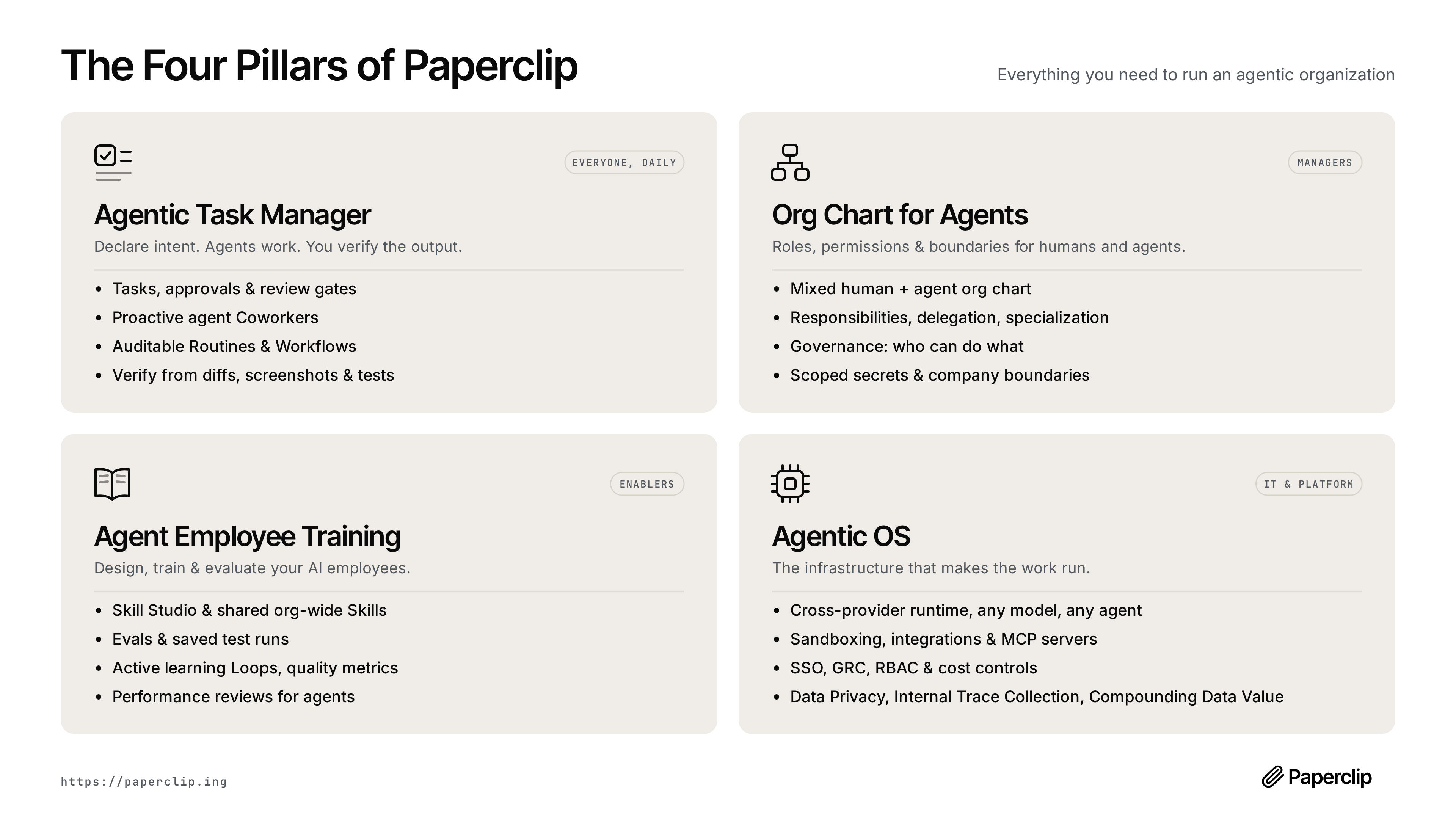
| Pillar | Built for | What it covers |
|---|---|---|
| Agentic Task Manager — Declare intent. Agents work. You verify the output. | Everyone, daily | Tasks, approvals & review gates · proactive agent coworkers · auditable routines & workflows · verify from diffs, screenshots & tests |
| Org Chart for Agents — Roles, permissions & boundaries for humans and agents. | Managers | Mixed human + agent org chart · responsibilities, delegation, specialization · governance: who can do what · scoped secrets & company boundaries · connection permissions & responsible-user identities |
| Agent Employee Training — Design, train & evaluate your AI employees. | Enablers | Skill Studio & shared org-wide skills · evals & saved test runs · active learning loops & quality metrics · performance reviews for agents · saved test inputs · skill version history & restore · reusable team templates |
| Agentic OS — The infrastructure that makes the work run. | IT & platform | Cross-provider runtime: any model, any agent · sandboxing, integrations & MCP servers · SSO, GRC, RBAC & cost controls · data privacy, internal trace collection, compounding data value · personal & shared app connections · run history & opt-in tracing |
Features
🔌 Bring Your Own AgentAny agent, any runtime, one org chart. If it can receive a heartbeat, it's hired. |
🎯 Goal AlignmentLink tasks and projects to your organization goals. Agents receive the goal context behind their work. |
💓 HeartbeatsAgents wake for assigned work, follow-up messages, or configured schedules. Delegation flows up and down the org chart. |
💰 Cost ControlCompany, agent, and project budgets. Track reported spend, get threshold alerts, and pause work at configured limits. |
🏢 Multi-OrganizationOne deployment, many organizations. Separate tasks, agents, permissions, and activity histories for each. |
🎫 Task ThreadsKeep conversations, plans, blockers, files, and run history attached to the work. Assign tasks to agents or people. |
🛡️ GovernanceConfigure review and approval stages, approve hires, and pause, reassign, or stop work when needed. |
📊 Org ChartHierarchies, roles, reporting lines. Your agents have a boss, a title, and a job description. |
📱 Mobile ReadyMonitor and manage your autonomous businesses from anywhere. |
🔗 Apps & ConnectionsConnect services such as GitHub, Notion, and Railway, or your own MCP server. Set gateway actions to Allowed, Ask first, or Off. |
👥 Shared Agents, Personal AccountsChoose who can use a connection and which agents can access it. Managed GitHub operations can use the account of the person directing the work. |
🧠 Skills & Skill StudioInstall or write shared skills, test them with saved inputs, inspect results, and restore earlier versions. |
📅 Scheduled RoutinesRun recurring work on a schedule or trigger it through an API or webhook. Each run has a task, an owner, and a history. |
📎 Artifacts & FeedbackFind the files and documents agents produce. Preview supported formats and leave comments on specific passages in documents. |
📦 Ready-Made TeamsPreview and install teams with roles, skills, projects, and routines. Choose their runtimes and make the setup your own. |
Experimental Agent Chat and chat/email connectors add conversations with agents in Paperclip and through configured services such as Slack, Discord, Telegram, and AgentMail. Enable the relevant instance settings to try them.
Problems Paperclip solves
| Without Paperclip | With Paperclip |
|---|---|
| ❌ You have 20 Claude Code tabs open and can't track which one does what. On reboot you lose everything. | ✅ Tasks are ticket-based, conversations are threaded, sessions persist across reboots. |
| ❌ You manually gather context from several places to remind your bot what you're actually doing. | ✅ Context flows from the task up through the project and company goals — your agent always knows what to do and why. |
| ❌ Folders of agent configs are disorganized and you're re-inventing task management, communication, and coordination between agents. | ✅ Paperclip gives you org charts, ticketing, delegation, and governance out of the box — so you run a company, not a pile of scripts. |
| ❌ Runaway loops waste hundreds of dollars of tokens and max your quota before you even know what happened. | ✅ Spend tracking, budget alerts, and automatic pauses help you control the cost of ongoing work. |
| ❌ You have recurring jobs (customer support, social, reports) and have to remember to manually kick them off. | ✅ Routines create assigned tasks on a schedule, with outputs and run history you can inspect. |
| ❌ You have an idea, you have to find your repo, fire up Claude Code, keep a tab open, and babysit it. | ✅ Add a task in Paperclip. Your coding agent works on it until it's done. Management reviews their work. |
Why Paperclip is special
Paperclip handles the hard orchestration details correctly.
| Atomic task checkout. | A single assignee and execution locks prevent competing runs from claiming the same task. |
| Persistent work context. | Tasks, comments, and documents stay in Paperclip. Supporting adapters resume saved sessions across runs. |
| Runtime skill injection. | Agents can learn Paperclip workflows and project context at runtime, without retraining. |
| Governance with rollback. | Approval gates are enforced, config changes are revisioned, and bad changes can be rolled back safely. |
| Accountable connections. | Human access, agent eligibility, and gateway action permissions are separate controls. Approve a call once or save a revocable rule. |
| Goal-aware execution. | Linked tasks and projects carry goal ancestry so agents see the "why," not just a title. |
| Portable company templates. | Export/import orgs, agents, and skills with secret scrubbing and collision handling. |
| Organization boundaries. | Company-scoped access checks keep each organization's work, agents, and activity separate within one deployment. |
What's Under the Hood
Paperclip is a full control plane, not a wrapper. Before you build any of this yourself, know that it already exists:
┌──────────────────────────────────────────────────────────────┐
│                       PAPERCLIP SERVER                       │
│                                                              │
│  ┌───────────┐  ┌───────────┐  ┌───────────┐  ┌───────────┐  │
│  │Identity & │  │  Work &   │  │ Heartbeat │  │Governance │  │
│  │  Access   │  │   Tasks   │  │ Execution │  │& Approvals│  │
│  └───────────┘  └───────────┘  └───────────┘  └───────────┘  │
│                                                              │
│  ┌───────────┐  ┌───────────┐  ┌───────────┐  ┌───────────┐  │
│  │ Org Chart │  │Workspaces │  │  Plugins  │  │  Budget   │  │
│  │ & Agents  │  │ & Runtime │  │           │  │ & Costs   │  │
│  └───────────┘  └───────────┘  └───────────┘  └───────────┘  │
│                                                              │
│  ┌───────────┐  ┌───────────┐  ┌───────────┐  ┌───────────┐  │
│  │ Routines  │  │ Secrets & │  │ Activity  │  │  Company  │  │
│  │& Schedules│  │  Storage  │  │ & Events  │  │Portability│  │
│  └───────────┘  └───────────┘  └───────────┘  └───────────┘  │
└──────────────────────────────────────────────────────────────┘
         ▲              ▲              ▲              ▲
   ┌─────┴─────┐  ┌─────┴─────┐  ┌─────┴─────┐  ┌─────┴─────┐
   │  Claude   │  │   Codex   │  │   CLI     │  │ HTTP/web  │
   │   Code    │  │           │  │  agents   │  │   bots    │
   └───────────┘  └───────────┘  └───────────┘  └───────────┘
The Systems
|
Identity & Access — Two deployment modes (trusted local or authenticated), human roles and permissions, agent API keys, short-lived run JWTs, company memberships, and invite flows. Responsible-user attribution follows work through delegation and supported managed connections. |
Org Chart & Agents — Agents have roles, titles, reporting lines, permissions, and budgets. Adapter examples match the diagram: Claude Code, Codex, CLI agents such as Cursor/Gemini/bash, HTTP/webhook bots such as OpenClaw, and external adapter plugins. If it can receive a heartbeat, it's hired. |
|
Work & Task System — Issues carry company/project/goal/parent links, atomic checkout with execution locks, first-class blocker dependencies, comments, documents, attachments, work products, labels, and inbox state. Search across work, review document revisions, and leave anchored feedback. |
Heartbeat Execution — DB-backed wakeup queue with coalescing, budget checks, workspace resolution, secret injection, skill loading, and adapter invocation. Runs produce logs, usage records, and adapter-specific session state. Bounded recovery handles supported failures and surfaces cases that need human action. |
|
Workspaces & Runtime — Project repositories and workspaces, optional isolated execution workspaces (git worktrees, operator branches), and runtime services (dev servers, preview URLs). Sandbox providers extend execution beyond the local host; availability depends on the configured environment and adapter. |
Governance & Approvals — Board approval workflows, execution policies with review/approval stages, decision tracking, budget hard-stops, and agent pause/resume/terminate. Configured task reviews govern completion; connection action approvals govern calls through the tool gateway. |
|
Budget & Cost Control — Token and cost tracking by company, agent, project, goal, issue, provider, and model. Scoped budget policies with warning thresholds and hard stops. Enforcement uses recorded spend; usage reporting and in-flight work can delay a stop. |
Routines & Schedules — Recurring tasks with cron, webhook, and API triggers. Concurrency and catch-up policies. Each routine execution creates a tracked issue and wakes the assigned agent — no manual kick-offs needed. |
|
Plugins — Instance-wide plugin system with out-of-process workers, capability-gated host services, job scheduling, tool exposure, and UI contributions. Extend Paperclip without forking it. |
Secrets & Storage — Company secrets and per-person secret values, encrypted credential storage, local or S3-compatible file storage, attachments, and work products. Secret references supply credentials to authorized runs without copying values into ordinary agent configuration. |
|
Activity & Events — Mutating actions, heartbeat state changes, cost events, approvals, comments, and work products are recorded as durable activity so operators can audit what happened and why. |
Company Portability — Preview, export, and import organization packages with agents, skills, and optional projects, routines, tasks, and attachments. Referenced secret values are omitted; review packages before sharing because plain environment values and local paths can remain. Packages share an operating setup; full-instance recovery uses backups. |
What Paperclip is not
| Not just a chatbot. | Conversations stay attached to tasks, plans, decisions, and outputs. Experimental Agent Chat can hand work off to assigned tasks. |
| Not an agent framework. | We don't tell you how to build agents. We tell you how to run a company made of them. |
| Not just a workflow builder. | Routines operate within an organization, with roles, goals, budgets, and governance. |
| Not a prompt manager. | Agents bring their own prompts, models, and runtimes. Paperclip manages the organization they work in. |
| Not limited to one agent. | Start with one agent and grow into a team with shared skills, delegation, and review. |
| Not only for code review. | Coding and PR review fit alongside research, operations, content, and other work. |
Quickstart
Open source. Self-hosted. No Paperclip account required. Follow the guided quickstart to set up your first agent.
Just ask your agent to install Paperclip
Share the installation guide with your agent.
Or install it yourself
With Node.js 24.11 or newer installed:
npx paperclipai@latest onboard --yes
The CLI runs from npm's cache; your instance configuration and data persist locally.
See the installation guide for managed installs, pinned versions, canary and git-ref installs, updates, rollback, service management, and uninstalling.
For an isolated manual test instance that is already initialized with a CEO
agent, use test-drive. It stays in the foreground, never installs a service
or creates a first task, and opens the browser only after setup succeeds:
ANTHROPIC_API_KEY=... npx paperclipai test-drive
OPENAI_API_KEY=... npx paperclipai test-drive --harness codex
OPENROUTER_API_KEY=... npx paperclipai test-drive \
  --harness opencode \
  --model openrouter/anthropic/claude-sonnet-4.5
Each run without --data-dir gets a unique, retained temporary directory; its
absolute path is printed at startup. Pass --data-dir to reuse one, or
--no-browser to leave the initialized instance unopened. When invoked from a
linked Git worktree, test-drive also enables task execution in that worktree.
See the test-drive guide for credential and
reuse behavior.
Troubleshooting: private npm registry
.npmrcIf this fails with an
E404forpaperclipai(or similar) and you use a private npm registry (for example GitHub Packages) via a global~/.npmrc,npxmay be resolvingpaperclipaiagainst that private registry instead of the public npm registry.Diagnostic:
npm config get registryWorkaround (cross-platform; force the public npm registry for this command):
npx --registry https://registry.npmjs.org paperclipai@latest onboard --yes
That quickstart path now defaults to trusted local loopback mode for the fastest first run. To start in authenticated/private mode instead, choose a bind preset explicitly:
npx paperclipai@latest onboard --yes --bind lan
# or:
npx paperclipai@latest onboard --yes --bind tailnet
If you already have Paperclip configured, rerunning onboard keeps the existing config in place. Use npx paperclipai configure to edit settings.
Or manually:
git clone https://github.com/paperclipai/paperclip.git
cd paperclip
pnpm install
pnpm dev
This starts the UI and API at http://localhost:3100. An embedded PostgreSQL database is created automatically — no setup required.
Requirements: Node.js 24.11+, pnpm 9.15+
Local Claude and Codex subscription sign-in also needs Python 3 and the corresponding provider CLI on the Paperclip host. The Docker image includes them.
Source development also builds the native Paperclip Runner when enabled (the self-hosted default). Install a Rust toolchain, or set PAPERCLIP_RUNNER_BINARY to a compatible prebuilt runner.
FAQ
Q: Is this project maintained or just slop?
A: Paperclip is maintained by the Paperclip team. We've merged over 2,700 pull requests.
Q: What does a typical setup look like?
A: Locally, a single Node.js process manages an embedded Postgres and local file storage. For production, point it at your own Postgres and deploy however you like. Configure projects, agents, and goals — the agents take care of the rest.
For remote access, use authenticated mode with a private-network bind such as Tailscale, or deploy the persistent server with Docker. See deployment modes and the Docker guide.
Q: Can I run multiple companies?
A: Yes. A single deployment can host multiple organizations with company-scoped data and access checks.
Q: How is Paperclip different from agents like OpenClaw or Claude Code?
A: Paperclip uses those agents. It orchestrates them into a company — with org charts, budgets, goals, governance, and accountability.
Q: Why should I use Paperclip instead of just pointing my OpenClaw to Asana or Trello?
A: Agent orchestration has subtleties in how you coordinate who has work checked out, how to maintain sessions, monitoring costs, establishing governance - Paperclip does this for you.
(Bring-your-own-ticket-system is on the Roadmap)
Q: Do agents run continuously?
A: Agents wake for assigned work and follow-up messages. Optional timer heartbeats let them check for work periodically; routines create recurring tasks on their own schedules. You can also connect externally running agents such as OpenClaw. A mention alone does not assign work or wake another agent.
Development
pnpm dev              # Full dev (API + UI, watch mode)
pnpm dev:once         # Full dev without file watching
pnpm dev:server       # Server only
pnpm dev:mobile       # Serve prebuilt UI on :3101 for phones/tablets (proxies /api → :3100)
pnpm dev:both         # Run `pnpm dev` and `pnpm dev:mobile` together
pnpm build            # Build all
pnpm typecheck        # Type checking
pnpm test             # Cheap default test run (Vitest only)
pnpm test:watch       # Vitest watch mode
pnpm test:e2e         # Playwright browser suite
pnpm db:generate      # Generate DB migration
pnpm db:migrate       # Apply migrations
pnpm test does not run Playwright. Browser suites stay separate and are typically run only when working on those flows or in CI.
See doc/DEVELOPING.md for the full development guide.
Roadmap
- ✅ Plugin system (e.g. add a knowledge base, custom tracing, queues, etc)
- ✅ Get OpenClaw / claw-style agent employees
- ✅ companies.sh - import and export entire organizations
- ✅ Easy AGENTS.md configurations
- ✅ Skills Manager, Skill Studio & Skills Store
- ✅ Scheduled Routines
- ✅ Better Budgeting
- ✅ Agent Reviews and Approvals
- ✅ Multiple Human Users
- ✅ Cloud / Sandbox agents (e2b, Cloudflare, Daytona, Modal, Novita, boxd, self-hosted Kubernetes)
- ✅ Artifacts & Work Products
- ✅ Deep Planning (planning mode, revisioned plans, plan approvals)
- ✅ Enforced Outcomes (watchdogs, recovery actions, review gates)
- ✅ MCP Tool Gateway & Apps (governed tool access)
- ✅ Secrets Manager with per-agent access
- ✅ Activity log & action attribution
- ✅ Self-healing runs & automatic recovery
- ✅ Agent evals & feedback
- ✅ Connected Apps
- ✅ Personal & Shared AI Accounts
- ✅ Shared Agents Use Personal GitHub Identities
- ✅ Skill Version History & Restore
- ✅ Document Comments & Revision History
- ✅ Company-Wide Search
- ✅ Multi-Model & Multi-Harness Teams
- 🟡 Memory / Knowledge
- ⚪ MAXIMIZER MODE
- ⚪ Work Queues
- ⚪ Self-Organization
- ⚪ Automatic Organizational Learning
- 🟡 Agent Chat
- 🟡 Cloud deployments
- ⚪ Desktop App
- ⚪ Bring-your-own-ticket-system (Asana / Linear / Jira as on-ramps)
This is the short roadmap preview. See the full roadmap in ROADMAP.md.
Community & Plugins
Find Plugins and more at awesome-paperclip
Observability
Paperclip ships with opt-in OpenTelemetry auto-instrumentation for the server (traces only). It activates when OTEL_EXPORTER_OTLP_ENDPOINT is set and supports grpc, http/protobuf, and http/json via the standard OTEL_EXPORTER_OTLP_PROTOCOL env var. @opentelemetry/api is a normal server dependency; the SDK, auto-instrumentation, and exporter packages are optional peer dependencies — install them only if you want tracing. See doc/observability.md for install commands and the full env-var reference.
Paperclip also ships with opt-in Sentry error monitoring for the server and the browser. Set SENTRY_DSN_FRONTEND to activate it for the browser and SENTRY_DSN_BACKEND to activate it for the server — each variable is optional, and the legacy SENTRY_DSN variable still works as a fallback for either component. The supported server SDK version is @sentry/node@10.71.0; it is an optional peer dependency for the server, so install it only if you want error monitoring. The browser SDK, @sentry/browser, is pinned to the same exact version. See doc/observability.md for the install command, the privacy settings, and the full default capture set.
Telemetry
Paperclip collects anonymous usage telemetry to help us understand how the product is used and improve it. No personal information, issue content, prompts, file paths, or secrets are ever collected. Private repository references are hashed with a per-install salt before being sent.
Contributors changing emitted telemetry events should follow the Telemetry Data Contract. For proposed first-party events that are not in the generated contract yet, follow Telemetry Workflow.
Telemetry is enabled by default and can be disabled with any of the following:
| Method | How |
|---|---|
| Environment variable | PAPERCLIP_TELEMETRY_DISABLED=1 |
| Standard convention | DO_NOT_TRACK=1 |
| CI environments | Automatically disabled when CI=true |
| Config file | Set telemetry.enabled: false in your Paperclip config |
Contributing
We welcome contributions. See the contributing guide for details.
Community
- Discord — Join the community
- Twitter / X — Follow updates and announcements
- GitHub Issues — bugs and feature requests
- GitHub Discussions — ideas and RFC
License
MIT © 2026 Paperclip Labs, Inc
Star History
Open source under MIT. Built for people who want to get work done, not babysit agents.